

Warranty support for Shopify
Good products.Better support.
Configure product warranties, guide customers through common fixes, and manage claims together inside Shopify.
Preparing for public launch Not yet in the Shopify App Store
Your support day, organized
Every issue. A clear next step.
01 / Submitted
A loose binding. A clear starting point.
Riley describes the issue and shares the steps already tried.
02 / Customer communication
The missing detail, in the same thread.
The store requests a closer look. Riley replies through the private claim page.
03 / Merchant review
Context for a considered decision.
The merchant reviews the description, attempted steps and customer conversation.
04 / Resolved by the store
A resolution everyone can follow.
The merchant marks the claim resolved. Riley can return to the private page for the update.
One fictional claim. A demonstration, not a live store.
One connected workflow
Protection,
by design.
Your customers get a clear place to start. Your team gets the context to take the next step.
Product-specific protection
Your products. Your terms.
Preview the rule here. Nothing is saved to a store.
Existing claims retain their saved coverage history.
Recorded warranty information
A useful place to start.
- Warranty period
- 12 months
- Coverage ends
- June 1, 2027
Within the recorded warranty period. Based on the date entered by the customer; the purchase has not been verified.
Guided troubleshooting
Let’s check the binding.
- Check that the mounting screws are secure.
- Inspect for missing washers or hardware.
- Check the binding is seated on its mounting plate.
Illustrative guide. Follow the product manufacturer’s safety instructions.
Claim submission preview
Keep the context.
In the real portal, customers provide their details and can attach supporting images.
Issue resolved through guidance
A fix without a claim.
The successful troubleshooting path returns the customer to support.
Fictional confirmation
The next step, connected.
Product, entered purchase date and attempted steps stay with the claim. Customers use a private link for updates and replies.
Preview only. No claim or email has been created.
#DEMO-1042
OpenReview, with the whole story.
- Issue
- Binding still moves
- Troubleshooting
- 3 steps attempted
“The binding is still loose after following the guide.”
The merchant reviews purchase details and decides the outcome.
Could you share a closer photo of the mounting point?
I’ve added a photo so you can see where it moves.
Illustrative conversation. No message is sent.
Preview only. Real claim actions require merchant authorization.
One connected workflow
Support that stays
with the product.
Give customers a useful next step. Give your team the context to act.
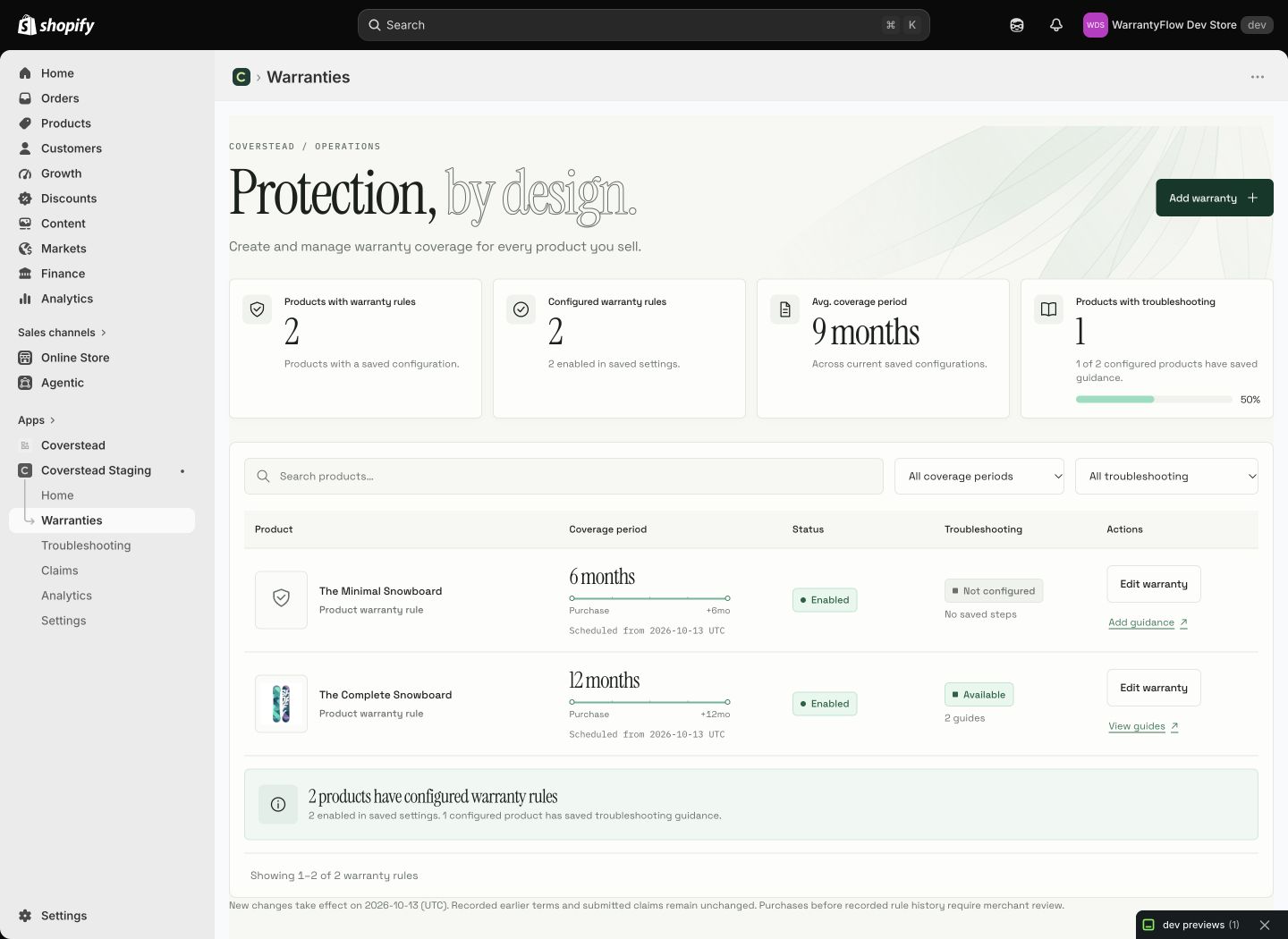
Set the terms, product by product.
Configure product-specific warranty periods and connect troubleshooting guides.
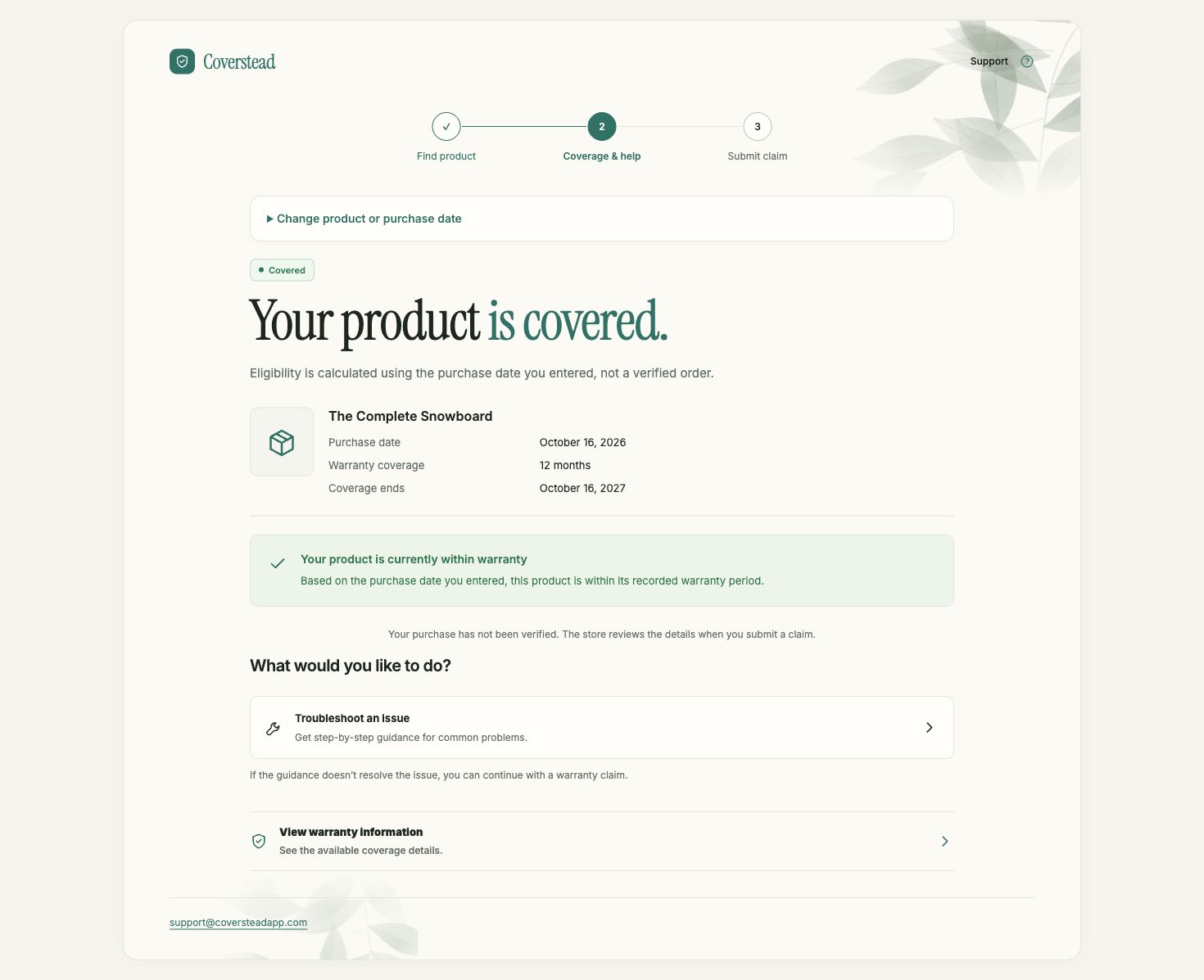
Give customers a useful next step.
Customers check recorded coverage and follow product-specific troubleshooting.
Keep claim review in one place.
Review issues and evidence, request information, and keep replies with each claim.
A closer look
Real tools for
real support.
Actual Coverstead interfaces, captured in our fictional demonstration store.
An organized inbox. A complete conversation.
Search and filter claims, then review the issue and customer replies in one place.
Swipe or scroll the screenshot to explore the interface.
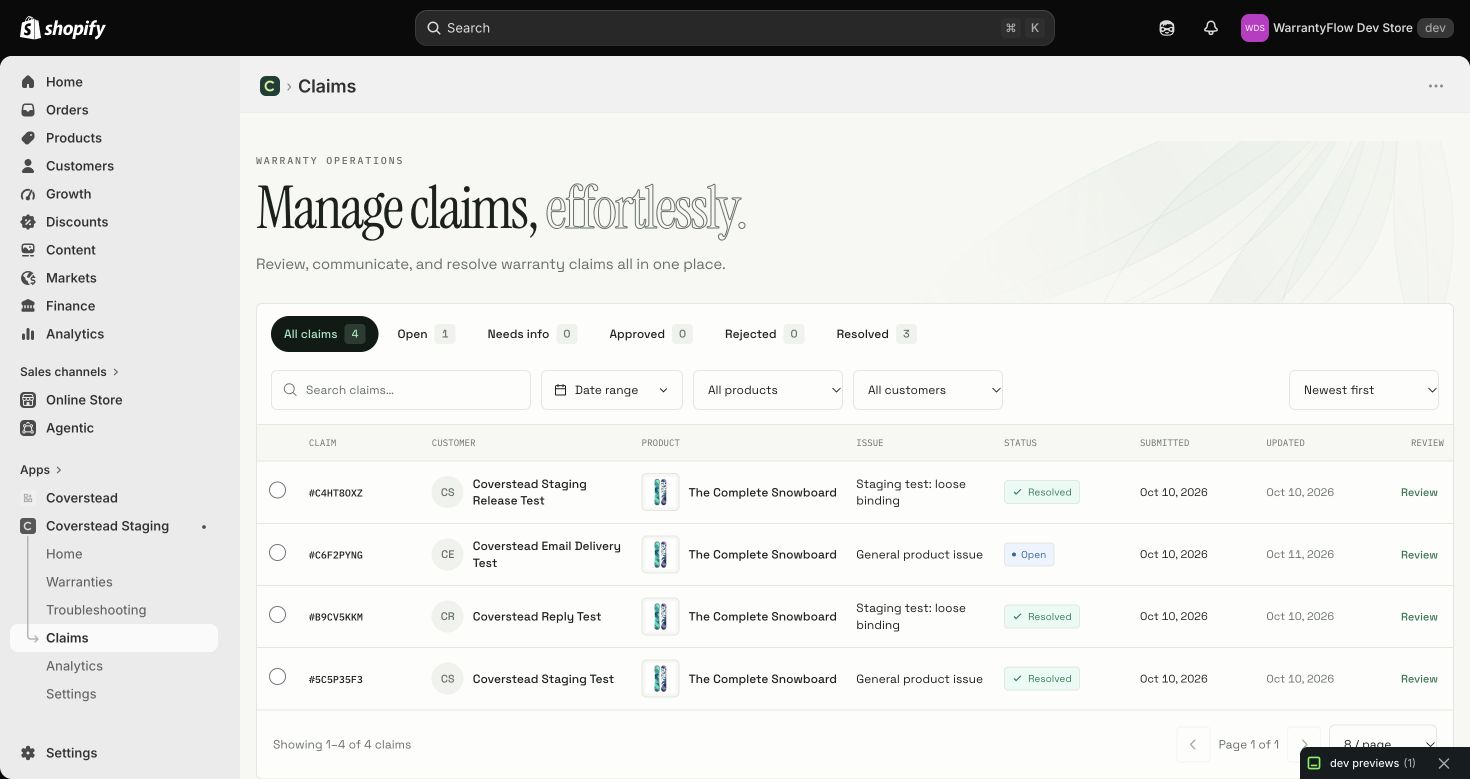
Warranty terms, product by product.
Set coverage periods and connect relevant troubleshooting guides for each product.
Swipe or scroll the screenshot to explore the interface.
A clear next step for your customer.
Recorded coverage, relevant troubleshooting, and claim support—without a customer account.
Swipe or scroll the screenshot to explore the interface.
Fictional test records only. Interface captures may show an earlier staging revision; no private claim links are included.
A few useful answers
Before you
get started.
Can I install Coverstead today?+
Not yet. Coverstead is currently under Shopify App Store review. Email hello@coversteadapp.com to discuss early access.
Does a coverage check verify a purchase?+
No. Coverage is calculated from the customer’s entered purchase date and the store’s recorded warranty rule. The store confirms purchase details and makes warranty decisions.
What happens if troubleshooting doesn’t work?+
For active recorded coverage, the customer can choose to continue to a claim with their attempted steps. If there is no matching guide, they can describe their issue through the supported claim flow.
Where do customer replies go?+
Customer conversations stay with the claim. Customers follow updates and add information through their private access link.
Does Coverstead approve claims or issue refunds?+
No. Your store reviews the details and decides the outcome. Coverstead organizes claim information and communications.
How does pricing work?+
Contact hello@coversteadapp.com about the available pilot and plan options before public launch. No subscription is started by emailing us.
Coming to Shopify
A calmer way to handle product support.
Preparing for public launch. Not yet available in the Shopify App Store.
Discuss early access Preparing for public launch · Not yet in the Shopify App Store